Hotels
In-room TV for every guest
Room-by-room IPTV with a management panel. We plan the network, install and support it. Licensed channels only.
Room-by-room IPTV with a management panel. We plan the network, install and support it. Licensed channels only.
Prices are starting prices. For custom needs use the quote form. Pay securely with PayPal or your wallet.
IPTV sends television over the network cables (or Wi-Fi) that already run through your hotel, hospital, office or campus. Instead of a separate cable for every TV, one managed system delivers licensed channels, video on demand, welcome screens and announcements to every screen.
In-room TV with welcome message, hotel info and room control.
Calm patient TV, waiting-room screens and notices.
News, internal channels and digital signage.
We work only with licensed channel packages.
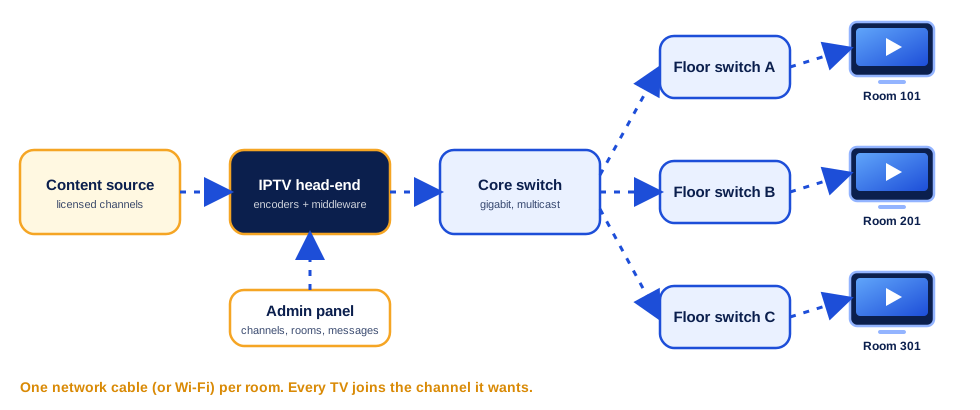
We design, supply, install and support the full system. First we visit (or review plans remotely) and count rooms, screens and cable paths. Then we prepare the head-end (the heart of the system), configure the network, connect set-top boxes or smart TVs, load the channel packages and train your staff on the management panel.
The head-end receives your licensed channels and converts them into network streams. Streams travel as multicast over a managed gigabit network: core switch, floor switches and one network cable (or Wi-Fi access point) to each room. Every TV or set-top box joins the stream of the channel it wants, so many TVs can watch at the same time without overloading the network.
Your guests, patients or staff simply use the remote control. You use a web panel to change channels, rooms, messages and rights.
The exact list depends on the building. Typical requirements are:
Number of rooms or screens, building type and wishes. Use the quote form.
We check cabling and network, and send a clear plan and price.
Head-end, network, boxes and channel packages are set up and tested.
We train your team and stay available for support.
From 10 screens in a clinic to hundreds in a hotel or campus. We size the head-end and network for your number of screens.
We help you get licensed channel packages. We do not provide illegal or unlicensed content.
Often yes, if the switches support multicast and the cabling is good. We check this in the survey.
Yes, on-site or remote depending on your location and needs. Ask for a quote.